
News
Spend Less Time Searching Recordings for the Evidence That Matters.
Spend Less Time Searching Recordings for the Evidence That Matters.
The Noise App

News
The Noise App
A noise report arrives. An officer opens the recording, listens, skips forward, rewinds and listens again, trying to find the sound that prompted the complaint.
Multiply that process across hundreds or even thousands of submissions, and audio review can quickly become a significant drain of time.
The Noise App’s new audio classification feature helps teams get to the relevant parts faster.
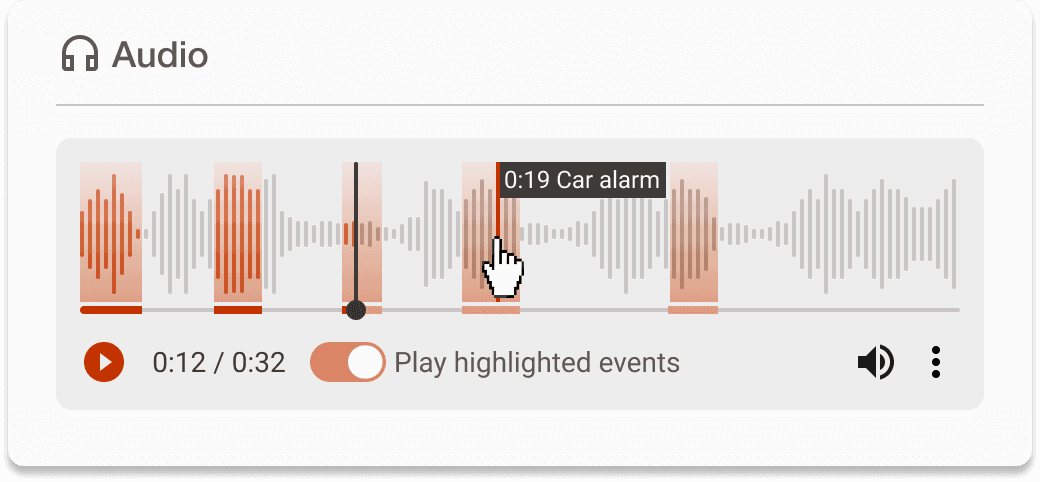
Submitted recordings are automatically analysed to identify likely sound events. These events are then displayed within the web app audio player, allowing officers to jump directory between them instead of repeatedly searching through the full recording.
This means, less time manually navigating audio, faster initial triage and more time available to process investigations.
There are no new steps for officers to complete. Classification takes place automatically when a reporter submits a recording though The Noise App.
The Noise App then:
Analyses the submitted audio
Detects likely sound events
Matches them to the noise assigned to the report
Displays relevant within the web app audio player
Allows officers to move directly between detected sections
The classifier uses noise source categories already supported by The Noise app, including barking dogs, construction noise and car alarms.
Officers remain in control of reviewing the recording, considering its relevance and deciding how the report should progress.
The Noise App processes more than one million noise reports every year.
Audio classification is designed to help environmental health teams manage this volume without review workload increasing at the same rate.
By making relevant sounds easier to locate, this feature can then help teams:
Review submitted recordings faster
Reduce repetitive listening and manual searching
Triage cases more efficiently
Identify potentially relevant evidence sooner
Spend more time progressing and resolving complaints
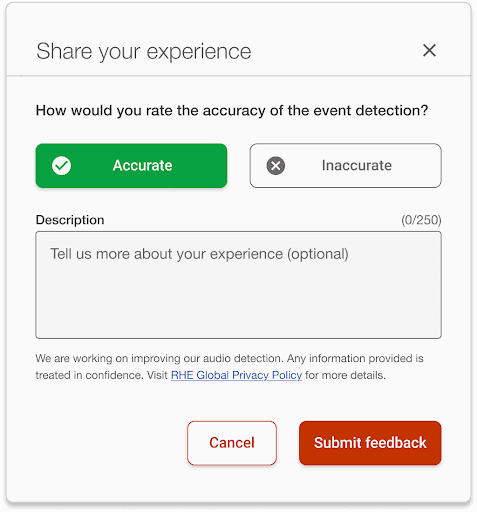
Users can also provide feedback on classifications, helping improve the model’s performance over time.
We are developing additional safeguarding support to help identify recordings that may contain indications of harm, violence or threats for appropriate review.
This capability is still in development and will build on our work to make audio review more efficient, responsible and useful for investigating teams.